

A busy Monday can leave an internal information technology (IT) team juggling urgent user requests, planned work and specialist security tasks. Supplemental IT support for internal teams can add agreed capacity without displacing the people who understand your organisation best. The key is to decide who owns each task before support begins.
It’s reasonable to be cautious: bringing in an external provider can create duplicated effort or leave issues unresolved if responsibilities aren’t clear. System access and information also need careful management. Agree the scope, escalation points, approvals and security controls in advance.
This guide explains how to divide day-to-day support, specialist work and escalations between your in-house team and an external provider. It covers what to include in the agreement, how to assess access and continuity arrangements, and how to choose a provider suited to your needs and location, including Southampton and the south coast.
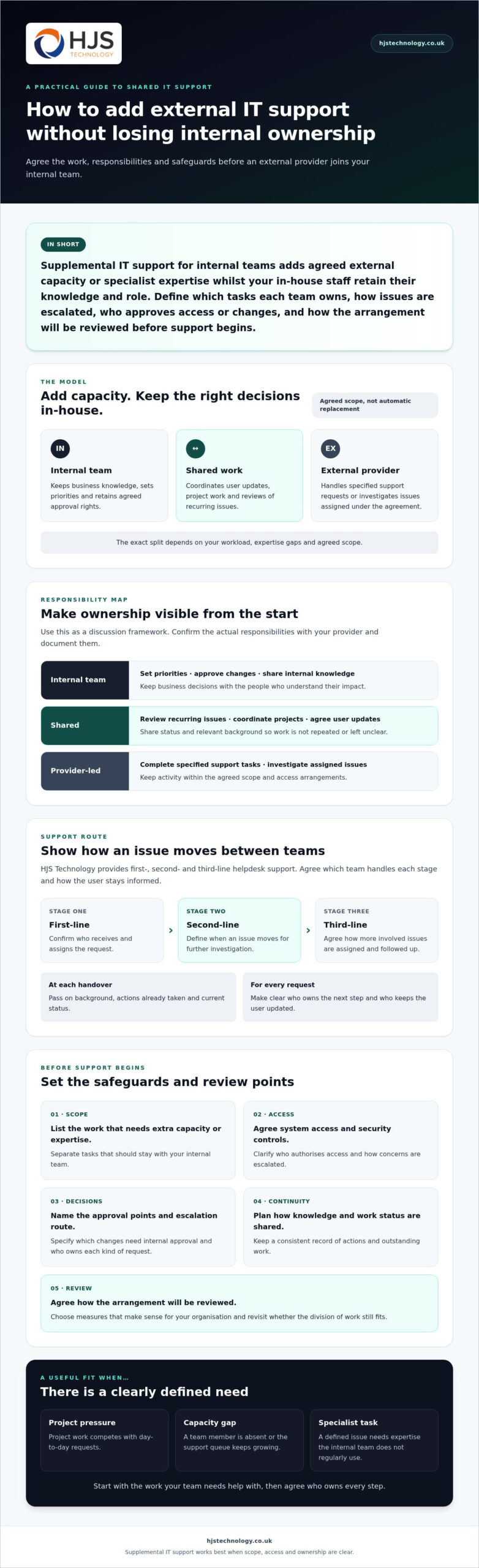
In short: Supplemental IT support for internal teams adds agreed external capacity or specialist expertise whilst your in-house staff retain their knowledge and role. Define which tasks each team owns, how issues are escalated, who approves access or changes, and how the arrangement will be reviewed before support begins.
Key Takeaways
- Supplemental IT support for internal teams can add agreed capacity or specialist expertise without automatically replacing in-house staff.
- Set clear ownership for support requests, escalations, approvals and user communications to reduce duplicated work and unresolved issues.
- Assess workload, expertise gaps, system access and review arrangements before choosing a support model. Define success using measures relevant to your organisation.
- HJS Technology’s first-, second- and third-line helpdesk support may complement an internal team, subject to confirming requirements and agreeing the scope.
What does supplemental IT support for internal teams include?
Supplemental IT support for internal teams is an agreed arrangement where an external provider takes on specific support tasks or adds expertise, whilst your in-house staff remain part of the IT function. It supplements rather than automatically replaces them. HJS Technology provides first-, second- and third-line helpdesk support, which may be relevant when discussing a clearly defined scope.
The arrangement might cover a particular workload, specialist input or issues escalated by your internal team. For example, an external team could handle an agreed category of user requests, assist with a project that needs extra technical capacity, or investigate problems outside the in-house team’s expertise. Agree the provider’s responsibilities and access arrangements before work begins.
This differs from fully outsourced IT, where an external provider takes responsibility for a broader range of IT operations. It also differs from hiring a permanent employee: supplemental support provides access to an agreed service rather than adding a member of staff to your organisation. Neither model is right for every business. Compare how each fits your workload, skills and priorities.
Which organisations may benefit from extra IT support?
Extra support may be useful when project work competes with day-to-day requests, a team member is absent, or the support queue keeps growing. It can also help when a defined task calls for expertise the internal team doesn’t regularly need.
The right fit depends on your team’s current skills, the type and volume of work, and what the business needs IT to prioritise. An organisation in Southampton, for example, might want to keep routine decisions in-house whilst agreeing external help for a defined area such as cyber security support in Southampton. That is one possibility to discuss, not a standard package or an assumption about what every organisation needs.
Before choosing a model, list the tasks that need more capacity or expertise and those that should stay with your internal staff. This gives both teams a practical starting point for agreeing responsibilities.
How can an external provider and internal IT team divide responsibilities?
Divide responsibilities by assigning clear ownership for each type of request, decision and escalation. The split below is an example only. Actual responsibilities depend on the agreed scope and must be confirmed with the provider.
| Area | Example responsibility |
|---|---|
| Internal | Set business priorities, approve changes and share knowledge of internal systems and processes. |
| Shared | Review recurring issues, coordinate project work and agree how users receive updates. |
| Provider-led | Handle specified support requests or investigate issues assigned under the agreement. |
HJS Technology Ltd provides first-, second- and third-line helpdesk support. Depending on the agreed division of work, those support levels could provide a route from initial assistance to more involved investigation. Confirm which team handles each stage, what information is needed and who keeps the user informed. Document the arrangements rather than relying on assumptions.
What should an escalation process make clear?
Set out who receives each request, how it is assigned and what triggers a move to another support level. For example, decide whether the internal team reviews all user requests first or whether the provider receives a defined category directly.
Agree how staff will share relevant background, actions already taken and status updates. A consistent record helps prevent repeated troubleshooting and gives both teams a shared view of outstanding work, without relying on unconfirmed response targets.
How can the internal team retain ownership?
Keep business priorities and approval rights with the people who understand their impact. Your internal team can remain the decision-making and relationship point whilst the provider completes agreed tasks. Specify which changes need internal approval and how the teams will record and share knowledge gained through support.
For security work, define who reviews or authorises actions and how concerns are escalated. If you’re considering external support in this area, HJS Technology Ltd outlines its cyber security services in Southampton. To discuss whether a defined support arrangement could fit your team, contact HJS Technology Ltd.
How should you assess a supplemental IT support arrangement?
Assess a supplemental IT support arrangement by checking what work needs covering, who owns decisions, how access will be controlled and how the arrangement will be reviewed. Agree these points before provider access begins. Then judge success against measures that matter to your organisation, not generic benchmarks.
- 1. Review current workload. Identify the requests, projects or recurring pressures your internal team can’t manage alongside its priorities.
- 2. Identify expertise gaps. Specify the skills or specialist input required, and distinguish these from work your team can already handle.
- 3. Assign ownership. Record which tasks the provider handles, what stays in-house, who approves changes and how issues are escalated.
- 4. Agree access and security. Define which systems and information the provider can access, who authorises that access, and how it will be managed and reviewed. Discuss the security responsibilities and required scope alongside HJS cyber security services in Southampton.
- 5. Set review arrangements. Decide how the teams will check whether the scope still fits as workload and business priorities change.
Choose operational measures that reflect the reason you’re bringing in support. These could include the number of requests awaiting action, the internal time spent on agreed tasks, or progress on planned project work. Establish a starting point with your team, then agree when and how to review it.
What questions should you ask a prospective provider?
Ask which tasks are included, excluded or referred back to your internal team. Clarify how provider access is approved, how technical notes and updates are recorded, and who communicates with staff. Agree how either team can raise a concern and how you’ll revisit the scope if needs change.
How do location and business needs affect provider choice?
Check whether remote support and any required on-site assistance suit your working arrangements, locations and equipment. For organisations in Southampton, Portsmouth, Winchester, Eastleigh, Fareham, Dorset, Poole, Hampshire, Salisbury, Wiltshire and Bournemouth, ask what local availability means in practice rather than assuming it is included. Compare the proposed arrangements with your operational needs and document any expectations you agree.
How can HJS Technology support your internal IT team?
HJS Technology may be able to support an internal IT team through a clearly agreed arrangement, subject to confirming your requirements and the scope of work. Its managed IT support includes first-, second- and third-line helpdesk support, giving organisations different support levels to discuss without assuming particular response times or service commitments.
A conversation can establish which requests might be handled externally, which decisions remain with your staff, and how issues move between teams. It can also clarify whether your requirements include security or cloud support, and how system access would be managed. The aim is to find a workable fit for your organisation, not apply a standard model to every team.
What should you prepare before discussing support?
A short outline of your current arrangements will make the discussion more useful. Note:
- Which IT responsibilities your team currently manages, along with recurring requests and known capacity gaps.
- Which systems may need support and any access or security requirements the provider should understand.
- What you want to clarify about scope, escalation, communications and how the arrangement would be reviewed.
This information helps both sides explore a suitable division of work and identify points that need agreement before support begins. You don’t need a technical specification. A clear description of the operational pressure or expertise you’re looking for is a practical starting point.
What is the next step for south coast organisations?
For organisations in Southampton and across the south coast, the right arrangement depends on existing skills, workload and business priorities. HJS Technology is based in Southampton. A discussion can help establish whether its support offering matches your requirements and what responsibilities need to be documented.
If you’re considering supplemental IT support for internal teams, bring your priorities and questions to an initial discussion. Then assess whether the proposed scope suits your organisation.
Build a support model that fits your team
Supplemental IT support for internal teams works best when it adds clearly defined capacity without taking decisions away from the people who know your organisation. Agree which work stays in-house, what the provider handles, how requests move between teams and how access is managed.
Before committing, assess your workload and expertise gaps, then decide how you’ll review whether the arrangement is helping. Clear responsibilities and regular communication can support day-to-day service continuity whilst keeping your internal team involved in priorities and approvals.
HJS Technology is based in Southampton and has been established since 2007. Its Managed IT Support includes first-, second- and third-line helpdesk support, which may suit an agreed division of work, subject to confirming your requirements and scope. The right fit depends on your organisation, not a one-size-fits-all model.
With a clear brief and shared expectations, you can explore a practical arrangement that supports your team and the wider business.
Frequently Asked Questions
What is supplemental IT support for internal teams?
Supplemental IT support for internal teams is external IT assistance that complements an organisation’s own IT staff. Depending on the provider and contract, it may include agreed helpdesk capacity, specialist work or support for escalated issues. It doesn’t necessarily replace the internal team. Before support begins, agree which tasks each party owns, how requests are handed over and who approves changes.
Can an external IT provider work alongside an in-house IT team?
Yes, an external provider can work alongside in-house staff when both teams understand their responsibilities and communication routes. Agree which requests each team handles, how unresolved issues are escalated and who approves changes that could affect the organisation. The practical arrangement depends on the services agreed with the provider, so document the scope and confirm how both teams will share relevant updates.
What tasks can supplemental IT support handle?
The tasks depend on your organisation’s needs and the provider’s agreed scope. Examples to discuss include extra helpdesk capacity, escalation support or specialist input for a defined area of IT. These aren’t guaranteed inclusions, so ask what the provider will cover, what remains with your internal staff and how work will be handed over. Clear boundaries help prevent duplicated effort and missed requests.
How do you choose an IT support provider to work with an internal team?
Start by documenting your workload, current responsibilities and capability gaps. Ask providers to explain their scope, escalation process, access controls, communications and review arrangements. Consider whether the proposed support fits your operational priorities without creating duplicate ownership. If you’re based in Southampton or elsewhere in Hampshire, check whether the provider’s location and any agreed on-site support suit your organisation. Confirm contractual details before deciding.
Is supplemental IT support the same as fully managed IT support?
Not necessarily. Supplemental support generally adds agreed capacity or expertise around an existing internal IT function, whilst fully managed IT support may cover a broader range of responsibilities. The distinction depends on each provider’s service definition and contract. Compare the actual scope, ownership and escalation arrangements rather than relying on service labels, and confirm which decisions and tasks will remain with your in-house team.