
Copilot Training
Copilot training inside Teams: the Zensai Adoption Hub
You have invested in Microsoft 365 and Copilot. The Adoption Hub delivers Copilot training your team will actually use, with bite-sized, ready-made courses right inside Teams, Outlook, SharePoint and Copilot.
No new portal. No extra logins. Just practical learning in the flow of work, deployed and supported by our Southampton team.
Figures published by Zensai.
What is the Zensai Adoption Hub?
The Zensai Adoption Hub, powered by Learn365, is ready-made Copilot and Microsoft 365 training that runs inside Teams, Outlook, SharePoint and Copilot. Your team learns using their existing Microsoft 365 sign-in, with no new portal. HJS Technology deploys it in hours, assigns learning paths and supports businesses across Southampton, Hampshire and the UK.
Licences bought. Features unused.
Most businesses only scratch the surface of Microsoft 365, and Copilot is no different. People are busy, separate training sites get forgotten, and new features quietly go unused while the monthly bill stays the same.
The Zensai Adoption Hub closes that gap by teaching people not just what the tools do, but how to use them in their day-to-day work, right inside the apps they already have open.
- Get real value from the licences you already pay for
- Build confidence with Copilot safely and practically
- Fewer "how do I...?" questions
Closing the adoption gap
Illustrative only.
How Copilot training works, from both sides
Scroll through what your team sees in Teams, then how managers assign and track it all.
 01
01
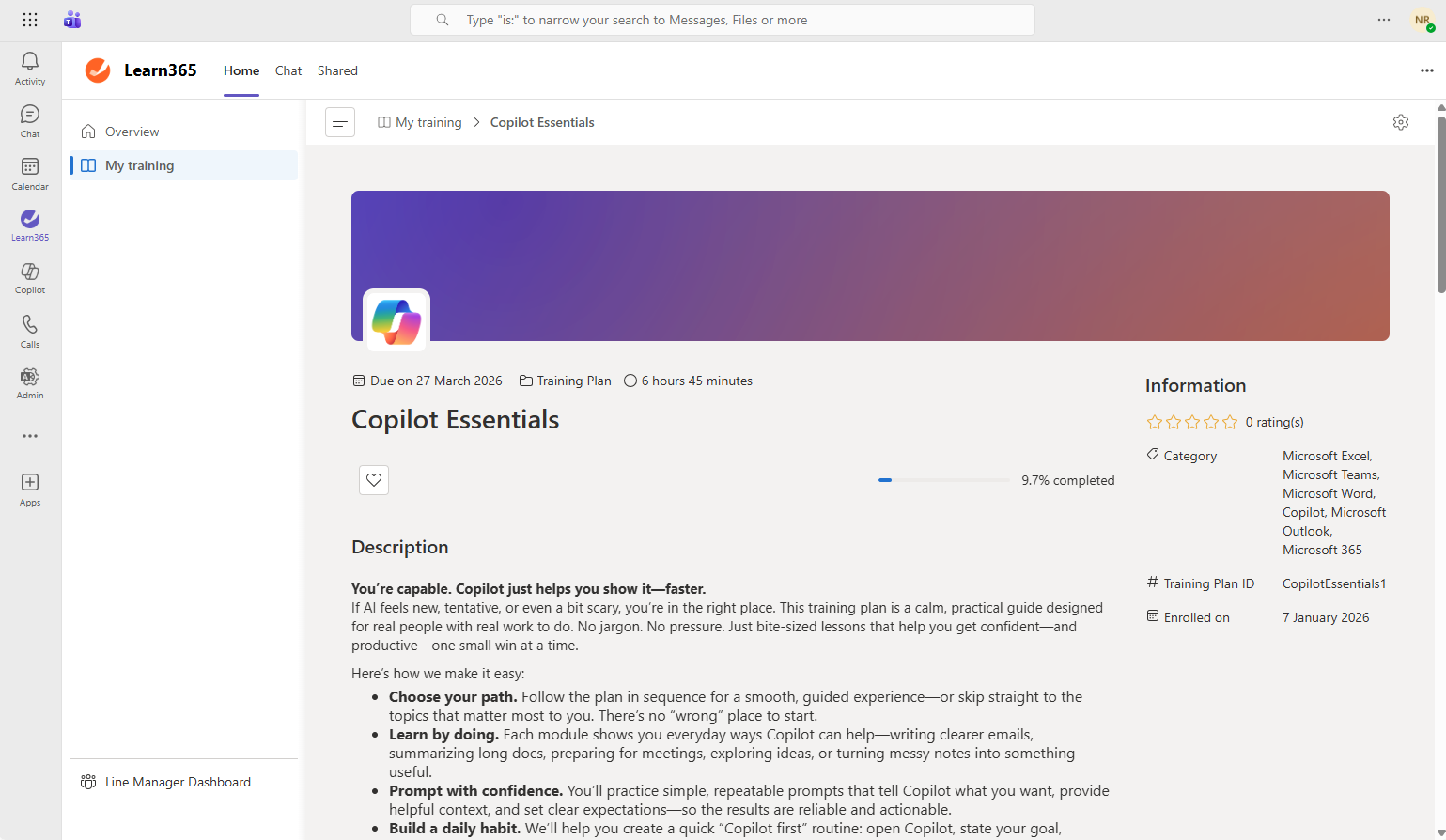
It lives inside Microsoft Teams
Training opens as an app in Teams, right next to chats, calls and meetings. People sign in with their existing Microsoft 365 account. No new website, no new password.
Everyone knows what to learn next
Each person sees a clear list of the training assigned to them, with status and due dates, so nobody has to guess where to start.
Bite-sized lessons that actually get finished
Short, practical Copilot and Microsoft 365 lessons fit between meetings, at a desk or on Teams mobile. Learning becomes a habit, not a chore.
 04
04
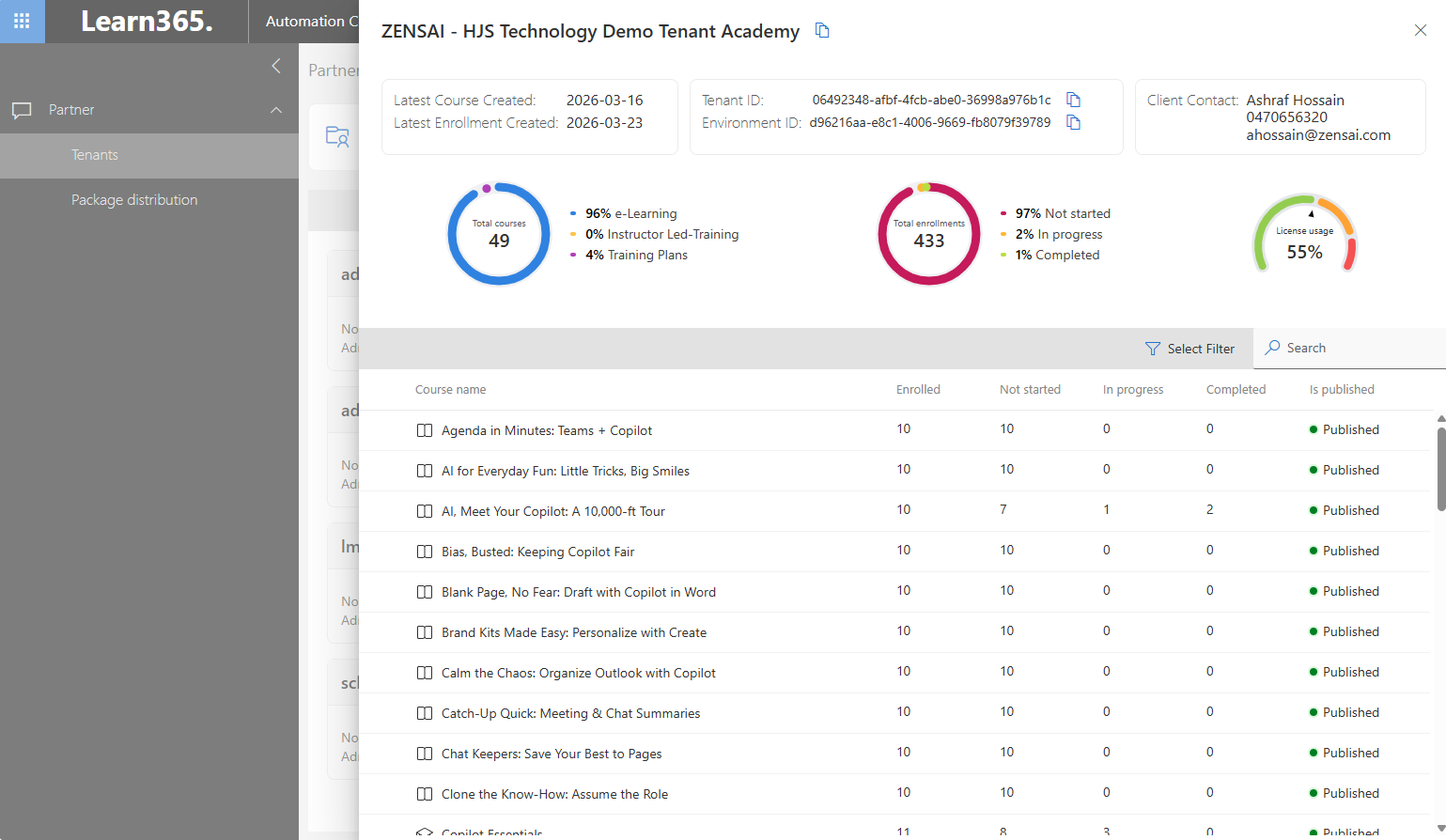
Assign training in a few clicks
Send courses and learning paths to individuals, departments or the whole business from one admin portal. Ready-made paths mean you can simply assign and go.
See who is progressing
Track who has started, finished or fallen behind in one place. No spreadsheets and no chasing people by email.
Spot the gaps, and we help close them
See where people need extra help so support goes where it is needed. We set everything up, review adoption with you and help the training stick.
Everything included in your Copilot training
Out-of-the-box training, plus the HJS Technology support to make it stick.
Curated course library
Ready-made courses that take people from Copilot novice to confident user, covering Copilot and the wider Microsoft 365 apps.
Guided learning paths
Structured training plans that walk people through features step by step, with chances to practise as they go.
Learn anywhere
Training lives in Teams, Outlook, Teams mobile and Copilot, so people can learn at their desk or on the move.
No setup headaches
No heavy administration and no separate sign-in. Deployment takes hours, not weeks.
Microsoft-level security
Built natively into Microsoft 365, so learning stays under the security and compliance controls you already have.
Rollout & support
We deploy it, assign the right paths, and help your team make the most of it, backed by our local support desk.
Inside the Microsoft 365 you already trust
Separate training platforms compete with the day job, and usually lose. Another login, another tab, another thing to remember.
The Adoption Hub works differently. It sits inside your existing Microsoft 365 environment, uses the sign-in your people already have, and shows up in the apps they open every morning.
- No new vendor portal for your team to learn
- Learn on desktop, web or Teams mobile
- Training available directly within Copilot
Your team
Learning at their desk or on the move
Teams, Outlook, SharePoint & Copilot
The apps they already use every day
Zensai Adoption Hub
Powered by Learn365, built natively into Microsoft 365
Your Microsoft 365 security
Existing sign-in, security and compliance controls
Copilot training portals vs in-app learning
How the Adoption Hub compares with a typical standalone training portal.
Everything included. No tiers, no add-ons.
There is just one Zensai Adoption Hub package. Your whole team gets the full Copilot and Microsoft 365 training experience, with rollout and support from HJS Technology built in.
Book a demo →- Full Microsoft 365 course library
- Ready-to-deploy learning paths
- Learn directly in Teams,
- Training directly within Copilot
- Teams mobile access
- Progress tracking for managers
- No extra logins or portals
- Setup & ongoing support from HJS
Your questions, answered
What is the Zensai Adoption Hub?
It is ready-made Copilot and Microsoft 365 training, powered by Learn365, that runs inside the apps your team already uses, including Teams, Outlook, SharePoint and Copilot.
Is there more than one package?
No. We offer the Adoption Hub as one all-inclusive package, covering the full course library, learning paths, in-app learning, progress tracking, rollout and ongoing support.
Do my team need another login?
No. It is built natively into Microsoft 365, so people learn using the sign-in they already have. There is no separate portal to remember.
Is it only Copilot training?
Copilot is a big focus, with courses like "Your First 10 Minutes with Copilot", but it also helps people get more from the wider Microsoft 365 tools they use every day.
How long does it take to set up?
Zensai says deployment takes hours rather than weeks. We handle the setup, assign the right learning paths and keep an eye on progress for you.
How much does Copilot training with the Adoption Hub cost?
Pricing is per user, per month. Book a demo and we will give you a quote based on your team size.
Is our data secure?
Yes. Learning runs inside your Microsoft 365 environment, under the security and compliance controls you already have in place.
Don't let your Copilot licences go unused
Book a complimentary Adoption Hub demo to see Copilot training running inside Teams, and how it could get your whole team confident with Microsoft 365.
Book a Demo
Secure a time with our Hampshire-based team for a walkthrough of the Adoption Hub.
- See the courses and learning paths
- Watch it working inside Teams and Copilot
- Get a quote for your team size