

Deciding on the right Microsoft 365 licence can be difficult, especially when balancing cost against security. For many small and medium-sized organisations in Hampshire, the jump from Business Standard to Business Premium seems like a significant expense. However, understanding the advanced security features included in the premium tier is essential for protecting your business from modern cyber threats and consolidating your IT costs. These are not just optional extras, they form a complete security system for your entire organisation. Properly configured, the tools within this licence provide enterprise-level protection that can replace several third-party security products.
As a Microsoft Solutions Partner, we help local firms understand and implement these powerful tools. This guide explains the core Microsoft 365 security features in plain English, showing how they protect your data, devices, and staff.
In short: Microsoft 365 Business Premium provides enterprise-grade security for SMEs, including Microsoft Defender for threat protection, Intune for device management, and Conditional Access for identity security. These tools work together to protect your data, secure mobile devices, and help your Hampshire-based business meet Cyber Essentials standards whilst consolidating your IT costs.
What are the main Microsoft 365 Business Premium security features?
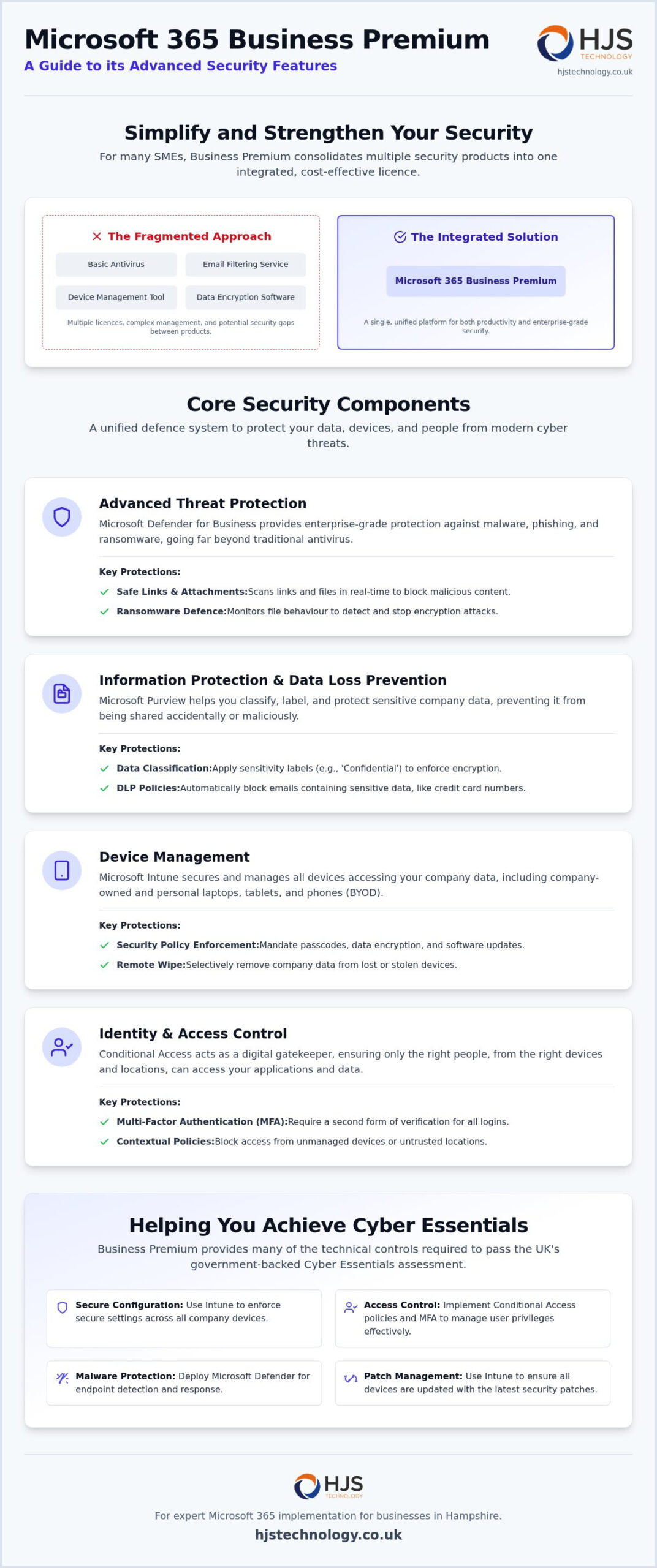
Microsoft 365 Business Premium is an integrated suite that combines productivity applications with enterprise-grade security for organisations with up to 300 users. Its core security components provide advanced threat protection, mobile device management, and sophisticated identity controls. This licence is designed to protect your business from common attacks like phishing and ransomware whilst simplifying your overall IT environment.
For many firms in Hampshire, this single licence replaces the need for separate email filters and basic antivirus software. It creates a unified system where all the security components work together, giving you a clearer picture of your security posture. This consolidation can lead to cost savings and reduced administrative overhead.
Advanced threat protection with Microsoft Defender
Microsoft Defender for Business is a key component of the suite, providing sophisticated protection that goes far beyond traditional antivirus. It actively monitors file behaviour to detect and block malware and zero-day threats before they can cause damage. This is particularly important for defending against ransomware attacks.
The service also includes Safe Links and Safe Attachments, which scan links and files in emails and Microsoft Teams in real time. If a user clicks on a malicious link or opens an infected attachment, Defender intervenes to block it. This feature is essential for protecting against the evolving phishing tactics seen across the South Coast business community.
Data loss prevention and information protection
Protecting sensitive data is a primary concern for any organisation. Microsoft Purview Information Protection helps you categorise and apply security labels to your data, such as documents containing customer records or financial information. These labels can enforce policies like encryption or restrict who can access the file.
Data Loss Prevention (DLP) policies build on this by preventing staff from accidentally or intentionally sharing sensitive information outside the organisation. For example, you can create a rule that blocks any email containing a spreadsheet with more than 50 credit card numbers from being sent externally. This ensures your organisation remains compliant with UK GDPR requirements whilst maintaining operational efficiency.
How does Business Premium protect company devices and data?
Effective security starts by ensuring that every laptop, tablet, and smartphone accessing your company data is secure and managed. Microsoft 365 Business Premium includes tools that allow you to enforce security policies on both company-owned and personal devices, a model often called Bring Your Own Device (BYOD). This is particularly relevant for hybrid teams in Winchester or Portsmouth who need secure access to company resources from any location.
Using these tools ensures that if a device is lost or stolen, company data can be wiped remotely without affecting the user’s personal files. This capability is critical for protecting your information and meeting your data protection obligations. It gives you control over your data, no matter where it is accessed from.
Managing mobile devices with Microsoft Intune
Microsoft Intune is a cloud-based service that focuses on mobile device management (MDM) and mobile application management (MAM). It allows you to control how your organisation’s devices are used and to configure specific security settings from a central dashboard. For example, you can mandate that all devices accessing company data must have a passcode and data encryption enabled.
With Intune, you can also ensure that all devices are running the latest security patches before they can connect to your network or access files in SharePoint. This dramatically reduces the risk of a breach occurring through an unpatched personal phone or a misconfigured laptop. It is a foundational tool for implementing a zero-trust security model.
Controlling access with Conditional Access
Conditional Access acts as a digital gatekeeper for your cloud applications and data. It works by enforcing access policies based on specific conditions, only allowing users to log in when all security criteria are met. This is one of the most powerful features for preventing unauthorised access to your systems.
For example, you can create a policy that requires Multi-Factor Authentication (MFA), a method that requires a second form of verification like a code from a mobile app, for all users. You could also restrict access to certain geographic locations, such as the UK only, or block logins from devices that are not managed by Intune. This feature is a powerful tool for preventing unauthorised logins from compromised credentials or foreign IP addresses.
Can Business Premium help my Southampton firm achieve Cyber Essentials?
Yes, Microsoft 365 Business Premium includes many of the technical controls required to pass the UK government-backed Cyber Essentials assessment. This scheme helps organisations protect themselves against a wide range of common cyber attacks and is often a requirement for winning public sector contracts or securing professional indemnity insurance. As an ISO 27001 certified company, we have helped numerous local firms use their M365 environment to secure this certification.
The integrated nature of Business Premium simplifies the process of demonstrating compliance. Instead of managing multiple different security products to meet the requirements, you can manage most of them from within a single administrative console. This makes the certification journey smoother and easier to maintain year after year.
Aligning with the five technical controls
The Cyber Essentials scheme is built around five key technical controls that protect against the most common types of cyber attack. Business Premium provides tools to help you meet each of these:
- Firewalls: Protection is provided by Microsoft Defender and secure cloud configurations that control traffic to your devices and cloud services.
- Secure Configuration: Intune policies allow you to enforce standardised, secure settings across all user devices, disabling unnecessary features and hardening them against attack.
- User Access Control: Access and administrative privileges are managed through Microsoft Entra ID (formerly known as Azure Active Directory), ensuring users only have access to the data they need.
Patch management and malware protection
The final two controls are also directly addressed by the security features in Business Premium. Keeping software and operating systems up to date is a critical part of security, and it is a core requirement of Cyber Essentials.
- Malware Protection: Microsoft Defender for Business provides the advanced anti-malware protection necessary to satisfy this control.
- Patch Management: Automatic updates deployed via Intune ensure all software is current, closing security holes that attackers might otherwise exploit.
Learn more about our Cyber Essentials certification services to see how we can guide you through the assessment process.
How should local businesses implement these security features?
Simply purchasing the Microsoft 365 Business Premium licence is not enough to secure your organisation. The security features must be correctly configured to be effective, and a misconfiguration could leave you exposed. A phased approach to implementation allows your team to adapt to new security measures without disrupting their daily work.
Partnering with a local Managed Service Provider (MSP) like HJS Technology ensures that your configuration aligns with security best practices. We have been supporting firms across Hampshire since 2007, providing the expertise needed for a secure and efficient setup. An expert partner can help you get the most value from your investment.
The role of a managed service provider in Southampton
Our process begins with an audit of your current M365 environment to identify security gaps and potential misconfigurations. From there, our team handles the technical setup of features like Intune and Conditional Access, creating policies that match your business needs and risk profile. We ensure a smooth transition for your staff, providing clear communication and support throughout the process.
Technology alone is not a complete solution. We also provide ongoing cyber security employee training to ensure your team remains your strongest line of defence against threats like phishing.
Next steps for your organisation
If you are considering upgrading your Microsoft 365 licence, the first step is to review your current security posture and business goals. This will help determine if Business Premium is the right fit for you. A clear understanding of your vulnerabilities is an important part of this process.
We recommend you:
- Review your current licensing to see if you are paying for overlapping third-party security tools that Business Premium could replace.
- Consider an automated penetration test to find vulnerabilities in your existing network before making changes.
- Contact our Southampton office to discuss how we can help you secure your business infrastructure with Microsoft 365.
Frequently Asked Questions
Is Microsoft 365 Business Premium worth the extra cost for a small business?
For businesses that handle sensitive data or need to meet compliance standards like Cyber Essentials, it is often worth the cost. It can be more cost-effective than purchasing separate products for email security, device management, and advanced threat protection. It consolidates security into a single, manageable platform.
Does Microsoft 365 Business Premium include a firewall?
It does not include a traditional hardware firewall, but it provides firewall-like protection through multiple layers. Microsoft Defender offers endpoint protection and network filtering on devices, whilst cloud security policies in Entra ID and Intune control access to your data, effectively acting as a firewall for your cloud environment.
Can I use Business Premium security features on personal devices?
Yes. Microsoft Intune allows you to apply security policies to personal devices (BYOD) to protect company data. It can create a separate, secure container on the device for work applications and data, which can be wiped remotely without affecting the user’s personal photos, apps, or files.
What is the difference between Business Standard and Business Premium security?
Business Standard offers basic security features, including protection against spam and malware. Business Premium adds a comprehensive suite of enterprise-grade security tools, including Microsoft Defender for Business (advanced endpoint protection), Microsoft Intune (device management), and Conditional Access (identity and access control).
How does Microsoft 365 Business Premium help with UK GDPR compliance?
It helps with UK GDPR compliance through its data governance features. Tools like Data Loss Prevention (DLP) and Information Protection allow you to identify, classify, and protect personal data. You can create policies to prevent this data from being accidentally shared and audit who is accessing it, which are key requirements of the regulation.
To find out how we can help secure your organisation with the powerful features in Microsoft 365 Business Premium, contact our Southampton team today.