

Copilot readiness starts with governed data and useful workflows, not licences. For businesses considering microsoft 365 copilot for business uk, the first step is understanding whether staff can access the right information, and only the right information, through Microsoft 365. A licence alone won’t resolve unclear permissions or show where Copilot could make a practical difference. HJS Technology’s AI and automation services include readiness assessments to help businesses plan this step.
Before introducing a new tool, get clear on two practical questions: is your SharePoint, OneDrive and Teams information well organised, and how will you judge whether Copilot is useful? This article covers preparation, from reviewing access and data governance to choosing workflows that suit your organisation. It also explains how to plan a controlled next step for businesses in Southampton, Portsmouth, Winchester, Eastleigh, Fareham, Dorset, Poole, Hampshire, Salisbury, Wiltshire and Bournemouth.
In short: A business is ready to consider Microsoft 365 Copilot when its information is appropriately governed, users have suitable access and there are practical workflows to test. Review permissions and data handling first, then run a controlled assessment or pilot. Define how you’ll judge its value before considering wider adoption.
Key Takeaways
- Assess whether microsoft 365 copilot for business uk supports a clear business purpose, rather than starting with licences alone.
- Review SharePoint, OneDrive and Teams permissions so employees can only surface information they’re authorised to access.
- Choose a specific workflow and user group, prepare them for the test, then evaluate what worked before expanding.
- A readiness assessment can identify useful applications and help shape a tailored plan for data governance and data loss prevention (DLP) guardrails.
Microsoft 365 Copilot: Is it right for your business?
Microsoft 365 Copilot is an AI assistant built into supported Microsoft 365 apps. It can help people work with documents, messages, meetings and other business information, but its value depends on whether it supports tasks your team actually needs to do. Businesses considering microsoft 365 copilot for business uk should start with useful work, not assumptions about the technology.
Depending on the app and setup, Copilot can help draft or rework text in Word, summarise email threads in Outlook, recap meetings in Teams and analyse information in Excel. It can also use work information that a user is permitted to access. Microsoft’s official Microsoft 365 Copilot overview explains the product and its app integrations.
Which business tasks could Copilot help with?
Start with familiar tasks where staff can readily review the result. For example, a team member could ask Copilot to:
- Draft a first version of a routine customer update using approved source material.
- Summarise a long email conversation into key points and outstanding actions.
- Turn meeting notes into a draft follow-up for an employee to check.
- Help explain patterns in a spreadsheet, with the user validating the figures and conclusions.
These are examples of assistance, not guarantees of accuracy. Copilot can make mistakes or miss context, so people should check its output before sharing it or acting on it. It should support human judgement, not make autonomous business decisions.
Usefulness also depends on your organisation’s tasks, information and working practices. A business with clear document processes may identify a suitable first task quickly, while scattered information or unclear responsibilities can make it harder to get useful results. The practical test is whether Copilot can assist with a defined task in a way your team can review and assess.
What should a UK business check before adopting Microsoft 365 Copilot?
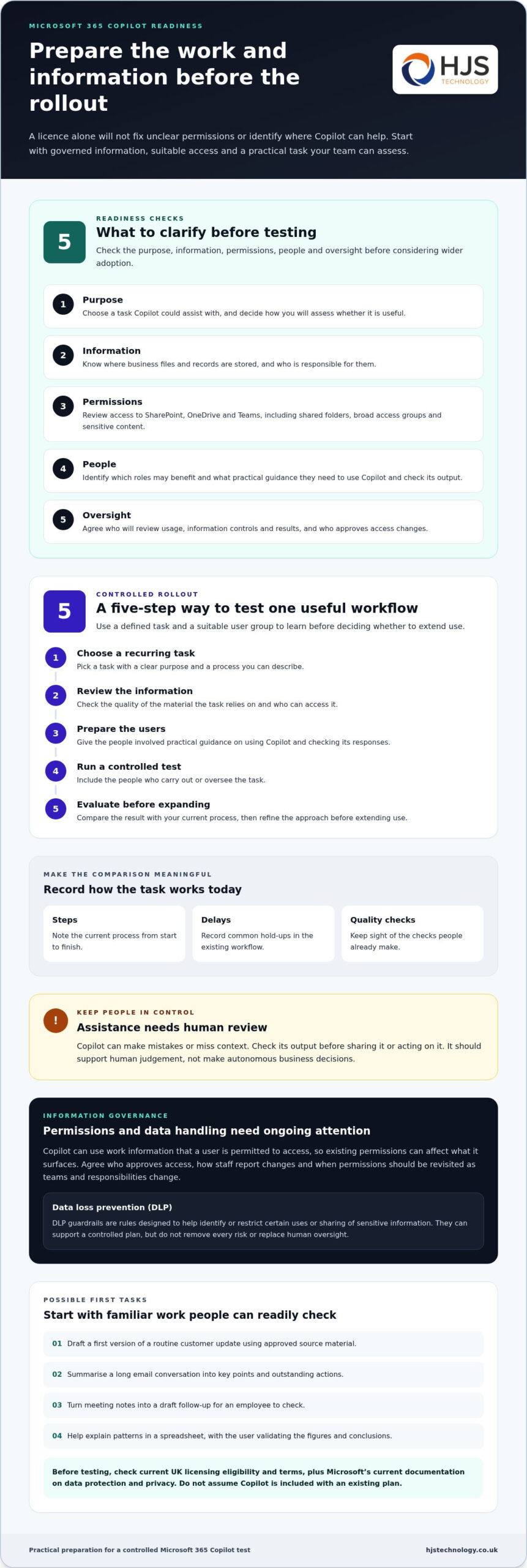
Before adoption, check that you have a clear business purpose, appropriately governed information, suitable access permissions, prepared users and named oversight. Readiness depends as much on how your organisation manages information as it does on the technology.
- Purpose: Identify a task Copilot could assist with and how you’ll assess its usefulness.
- Information: Know where business files and records are stored, and who owns them.
- Permissions: Review access to shared folders, sites and Teams content.
- People: Consider which roles may benefit and what guidance users need.
- Oversight: Decide who will review usage, information controls and results.
How should you review access to business information?
Map important information across SharePoint, OneDrive and Teams, then review access with the relevant business owners. Pay particular attention to old shared folders, broad access groups and content that may contain sensitive information. Copilot works with information a user is permitted to access, so existing permissions can affect what it surfaces.
Data governance is ongoing, not a one-off tidy-up. Agree who approves access, how staff report changes and when permissions should be revisited as teams and responsibilities change. Data loss prevention (DLP) guardrails are rules designed to help identify or restrict certain uses or sharing of sensitive information. They can support a controlled plan, but don’t remove every risk or replace human oversight. The ICO’s guidance on AI and data protection can inform your review.
What should you clarify about licensing and data handling?
Check current UK eligibility and terms in Microsoft’s licensing guidance; don’t assume Copilot is included with your existing plan. Review Microsoft’s current documentation on data protection and privacy as well, because product terms and configuration matter. HJS Technology can help you consider Microsoft 365 readiness and data governance as part of an AI readiness assessment. To discuss your requirements, contact HJS Technology.
How can you plan a useful, controlled Copilot rollout?
Plan a rollout around one defined business task, a suitable group of users and clear ways to assess the outcome. A measured test helps you learn where Copilot fits your organisation before deciding whether to extend its use.
- Choose a recurring task with a clear purpose and a process you can describe.
- Review the information the task relies on, including its quality and who can access it.
- Prepare the users with practical guidance on using Copilot and checking its output.
- Run a controlled test with the people who carry out or oversee the task.
- Evaluate the results against your current process, then refine your approach before expanding.
How do you choose a first Copilot use case?
Pick a task that happens regularly and has a clear start and finish, such as preparing a first draft from approved material. Name the people who will use it and who is responsible for reviewing the output. Before testing, note how the task is handled now, including the steps involved, common delays and quality checks, so you can make a meaningful comparison.
HJS Technology’s AI and automation services include readiness assessment and workflow planning to help identify practical applications for your organisation.
How should you prepare employees for adoption?
Give guidance that reflects each person’s role. Explain what information is appropriate to use, how to check generated content and when to follow established review or approval processes. Make it easy for users to raise concerns or share examples where the tool helped or fell short.
During the test, gather feedback from users and reviewers alongside agreed measures, such as time taken, rework required or completion quality. Compare these with the existing process, but don’t assume one measure suits every task or that results will be identical across teams. Use what you learn to refine the workflow, user guidance and oversight before considering a wider rollout.
For broader product context, refer back to the Microsoft 365 Copilot overview earlier in this guide.
How can HJS Technology help your business assess Copilot readiness?
HJS Technology’s Microsoft 365 Copilot readiness assessment and AI readiness diagnostic help your organisation identify practical uses for Copilot and the preparation needed to support them. The aim is a considered next step shaped around your business, rather than a standard rollout plan applied to every organisation.
Preparation can include reviewing how information is organised and accessed, identifying governance gaps and considering appropriate data loss prevention (DLP) guardrails. These controls can form part of a tailored adoption plan, helping you manage how sensitive information is handled without treating any single measure as a complete answer to risk.
What can a readiness discussion cover?
A readiness discussion can connect your business objectives with the workflows, information and people involved. HJS Technology is a Microsoft Solutions Partner and can shape preparation around your circumstances and priorities.
- Business objectives: Which tasks could benefit from assistance, and what would make a trial worthwhile?
- Information governance: Where is relevant information held, who can access it, and what needs attention?
- Initial workflows: Which defined tasks and user groups are suitable to consider first?
- Preparation: What guidance, access controls and oversight could support a controlled test?
Where a process could benefit from broader automation, HJS can also discuss workflow automation using Power Platform. This is a related service, not a guaranteed outcome of adopting Copilot. An assessment can help distinguish where Copilot may be useful from other practical improvement options, so your next step reflects the task and your existing ways of working.
For businesses across Southampton, Hampshire and the South Coast, a readiness assessment provides a structured way to move from interest in microsoft 365 copilot for business uk to an informed plan for your organisation.
Discuss your Copilot readiness with HJS Technology.
Make your next Copilot decision with confidence
The next step doesn’t need to be a company-wide commitment. Decide what you need to learn first: whether a particular task is suitable, what preparation it needs, or how to judge its value in your working environment. That gives your team a practical basis for deciding whether to proceed, adapt the approach or pause.
For organisations considering microsoft 365 copilot for business uk, a readiness conversation can turn broad interest into a clear, manageable decision. HJS Technology can discuss your priorities and help identify a suitable way forward based on your organisation’s needs.
A considered first step can help your business move forward at a pace that feels right, with a clearer view of what to do next.
Frequently Asked Questions
Is Microsoft 365 Copilot included in a business licence?
Not automatically. Use Microsoft’s current UK licensing guidance to check which Copilot offer applies and whether the relevant users meet its conditions. Eligibility and terms can change, so check again when planning a purchase or renewal. Keep a record of the guidance you relied on, then confirm expected features with users before setting rollout expectations.
Can a small business use Microsoft 365 Copilot?
A small business may be eligible, but headcount alone doesn’t guarantee access or make adoption worthwhile. Compare your organisation’s Microsoft 365 setup with Microsoft’s latest UK eligibility requirements. Then consider whether staff need Copilot’s app-based assistance for their work or whether their existing tools already meet that need. This keeps the decision focused on a specific business purpose, not simply the organisation’s size.
Does Microsoft 365 Copilot use company data to train public AI models?
Microsoft says Microsoft 365 Copilot prompts and responses aren’t used to train foundation models, although processing is needed to provide the service. For a decision based on your setup, review Microsoft’s current privacy and data-handling documentation and record relevant configuration choices for your internal review. This can inform your governance decisions, but it isn’t a guarantee that every use of company data is risk-free.
How much does Microsoft 365 Copilot cost for a UK business?
Check Microsoft’s current licensing guidance for applicable terms and eligibility, as these can change. To plan responsibly, establish which users would need access and include wider preparation work in your business case, such as user guidance, information clean-up and ongoing oversight. This gives decision-makers a clearer view of the adoption effort without relying on an outdated price or assuming the same approach suits every team.
How can a business check whether its data is ready for Copilot?
Look beyond access settings and assess whether staff can identify the most current, authoritative version of important documents. Duplicate policies or old procedure files, for example, can make it harder to know which material should inform a task. Ask document owners to identify trusted sources and retire or label superseded content where appropriate. A readiness assessment can help turn these findings into priorities, without suggesting that any review removes all risk.