

AI data leaks can start with a prompt, but they can also happen when an AI service connects to Microsoft 365, email or shared files and receives more access than it needs. For organisations in Southampton and Hampshire, the challenge is to support useful AI adoption whilst keeping information under control. HJS Technology’s cybersecurity services help businesses take a considered approach.
It can be difficult to see which tools staff use, where information is processed or retained, and what an app connection can access. A blanket ban is not the only option. This guide explains how prompts and connected apps can expose information, and how practical safeguards can reduce the risk.
In short: AI tools can expose business information through prompts or connected apps with more access than intended. Identify the tools in use, set clear boundaries for sensitive data, review app permissions and apply suitable access controls, monitoring and staff guidance. Together, these steps support useful AI adoption without relying on a blanket ban.
Key Takeaways
- Learn how information shared in AI prompts may be exposed, and why data handling varies between services.
- Review connected apps and permissions to spot access to Microsoft 365 files or email that may be broader than intended.
- Reduce risk by identifying AI use, setting clear data rules, managing access and reviewing activity.
- See how HJS Technology Ltd’s cybersecurity services, application management and user training can support controlled AI adoption across Hampshire.
How can AI tools expose business data?
AI-related data exposure happens when business information becomes accessible through an AI tool or connected app beyond the organisation’s intended control. It is a risk to assess, not proof that a breach has occurred. Clear oversight helps you understand where information goes and who or what can access it.
Exposure can happen when employees enter information into prompts or grant an AI service access to company systems. The risk depends on the tool, account type, settings and provider’s terms for handling submitted information. Services do not all store or use data in the same way, so review the relevant terms and settings rather than assuming they behave alike.
What information might employees share with AI tools?
A prompt can contain more than a general question. An employee might paste customer details to draft a reply, upload an internal document for a summary, or share commercially sensitive plans to prepare a presentation. Credentials such as passwords and access keys should never be entered into a prompt.
Give staff clear guidance on what information is suitable to share, and which approved account and settings to use. HJS Technology Ltd’s AI and automation services can support organisations looking to adopt AI with appropriate oversight.
Why can connected apps increase exposure?
Some AI services connect to business systems so they can work with files, email or other information. A connection may receive permissions approved by a user or administrator. If those permissions are broader than needed, or remain in place after a tool is no longer used, the service may be able to access more information than intended.
This is an access-management and visibility issue, not evidence that every integration is unsafe. Review what each connection can access, who approved it and whether that access is still required. For a closer look at AI within Microsoft 365, read our guide to Microsoft 365 Copilot for UK businesses.
Why do AI app connections create a security gap?
AI app connections create a security gap when an organisation cannot clearly see what access has been granted, which data it covers or who is responsible for reviewing it. This is a governance and visibility challenge, not proof that every AI app is unsafe.
Separate the AI tool, the apps connected to it and the business information those apps can access. A connection might let a tool work with selected files, or it might inherit permissions that reach a wider area of a user’s account. User consent, administrator approval and the user’s own access rights can all affect what becomes available.
App risk depends on its permissions, data access and ongoing oversight. This practical focus on access and accountability is also reflected in the NIST Cybersecurity, Privacy, and AI resources.
How can excessive permissions increase exposure?
Apply the principle of least privilege: give an app only the access it needs to do its specific job. For example, a tool intended to summarise a particular set of files may not need access to an entire document library or a user’s mailbox.
Review each connection’s permissions, business purpose and owner. Remove access when the tool is no longer needed or its purpose changes. Multi-factor authentication (MFA), which asks users to verify their identity in more than one way, can help protect accounts, but it does not replace careful app permission reviews. For practical guidance on account protection, see our cyber security services in Southampton and Hampshire.
What should businesses check before connecting an AI app?
Before approving a connection, check which permissions the app requests, which accounts or files they cover, how the provider handles data and how access can be revoked. Record approved integrations and assign an owner to each one, so someone can review whether access is still appropriate.
If you’d like help reviewing AI app access and wider security controls, talk to our team about your organisation’s requirements.
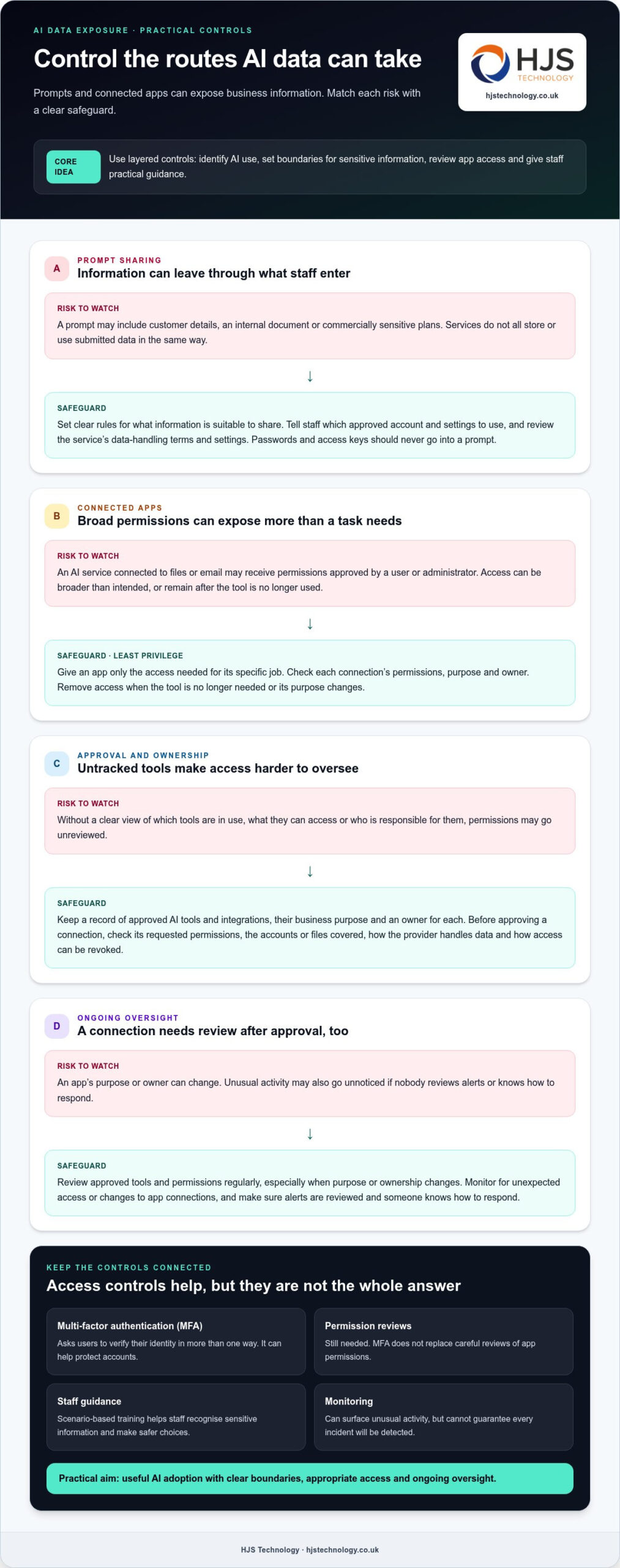
Which security controls can reduce AI data leak risks?
Reduce AI data leak risks with layered controls that identify how staff use AI, govern access, protect sensitive information, monitor activity and review permissions. No single setting prevents every leak, so combine technical safeguards with clear ownership and practical staff guidance.
Start with a record of approved AI tools and their business purposes. Set boundaries for information staff can share, assign an owner to each connected app and define who can approve new integrations. This gives your organisation a consistent way to assess requests rather than relying on informal decisions.
How should a business govern AI tools and integrations?
Use application management to understand which services and connections are in use, then compare their permissions with the task they perform. Conditional access means setting rules about who can use a service and under what conditions, such as requiring an approved account or a suitable sign-in method. Apply restrictions in proportion to risk, so useful work can continue without unnecessary access.
Available platform settings vary and can change, so check current capabilities against official product documentation before applying them. Review approved tools and permissions regularly, especially when an app’s purpose or owner changes.
How do monitoring and staff training help close the gap?
Monitoring can help surface unusual activity, such as unexpected access or changes to an app connection. It cannot guarantee that every incident will be detected: alerts need review, and someone must know how to respond. Scenario-based training helps staff recognise sensitive information and make safer choices before sharing it or connecting a service.
For support with layered controls, explore cybersecurity services for Southampton and Hampshire.
What should Hampshire businesses do next about AI data leaks?
Begin with a proportionate review of the AI tools staff use, the information they share and the access connected apps receive. A small organisation can make useful progress by assigning clear owners and prioritising important systems and data, without trying to solve everything at once.
What can a business review first?
Speak with staff about the AI tools and connected apps they use for work. Build a simple inventory and record each tool’s business purpose, owner, permissions and the types of information involved.
- Set clear boundaries for sensitive information, including customer details, financial records and internal documents.
- Check whether each app still needs its current access and whether that access is limited to the task.
- Agree who can approve new tools or connections, and who will review them later.
This gives you a practical starting point for wider security planning, alongside guidance in our cybersecurity services for Southampton and Hampshire.
When is specialist support useful?
Specialist support can help when you are unsure which apps can access business information, how well current controls fit your operations, or how to respond if information is exposed. HJS Technology’s security approach follows five steps: Identify, Protect, Detect, Respond and Recover. This means understanding the risks, putting safeguards in place, monitoring activity and preparing to act if an incident occurs.
For a smaller organisation, that may mean reviewing AI use and app access alongside existing identity, information and device controls, then agreeing practical next steps with accountable owners. The aim is to support useful AI adoption with appropriate oversight, not to impose a blanket ban.
Adopt AI with clear oversight and confidence
AI tools can expose business information through prompts and connected apps, particularly when staff and decision-makers cannot see what data is being shared or what access has been granted. Know which tools are in use, set clear boundaries for sensitive information, and regularly review app permissions and ownership.
As AI use increases, these controls help close visibility gaps without requiring a blanket ban. HJS Technology is based in Southampton and supports organisations across Hampshire and the south coast. Its cybersecurity services include prevention, monitoring, incident response and recovery, helping businesses align security with how they work.
With appropriate oversight, your organisation can make informed decisions about AI and keep useful tools within sensible boundaries.
HJS Technology supports organisations in Southampton, Portsmouth, Winchester, Eastleigh, Fareham, Dorset, Poole, Hampshire, Salisbury, Wiltshire and Bournemouth. Start with a clear picture of your tools and connections, then build controls that fit your organisation. Talk to HJS Technology about your next steps.
Frequently Asked Questions
Can using AI tools cause a business data leak?
Using AI tools does not automatically mean your business has suffered a data leak. Exposure can arise if staff share sensitive information in prompts, if data handling is unclear, or if connected apps have poorly governed access. Risk varies by tool, account type and configuration. Set clear boundaries for business information, review app permissions and check the provider’s current terms before staff use a service with company data.
Can AI apps access files in Microsoft 365?
Some AI apps can access Microsoft 365 files, but access depends on the app, the permissions granted, identity settings and administrator controls. An app does not automatically gain access to every file. Before approving a connection, review the requested permissions, which files or services are in scope, who owns the app and how access can be removed. Consult Microsoft’s official documentation for platform-specific settings and instructions.
What controls help prevent AI data leaks?
Use approved-use guidance, least-privilege access, app permission reviews, conditional access, information controls, monitoring and staff training together. For example, limit a connected app to the access it needs, set rules for who can use AI services and teach staff what not to share. These measures can reduce AI data leak risks, but no single control guarantees prevention. Review safeguards against your systems and information risks.
Should a business block all AI tools to protect its data?
A blanket block is not the only way to protect business data. Define permitted uses, identify sensitive information, govern app connections and apply access controls in proportion to risk. The right approach depends on your business needs and the information involved. Review your policy as tools and integrations change, so staff know which services they can use and what data to keep out of prompts.
How can a small business check whether an AI app is safe to use?
Check the provider’s current data handling terms, the permissions requested, which accounts or information are in scope, available retention settings and how to revoke access. Record the app’s business purpose and assign an owner before approving it. This review helps clarify risks, but cannot guarantee an app is safe. If access or data flows are unclear, seek specialist support before connecting it to business systems.