

A backup report can show that a copy was created, but it can’t prove your team can restore the files and systems the business depends on. To put tested backup and disaster recovery solutions in place, Hampshire businesses need to check that recovery works against real operational priorities, without causing avoidable disruption.
This guide explains how to review what’s backed up, test a restore safely and assess whether recovery would support day-to-day operations. It also shows how to prioritise the systems your organisation needs first, so each test produces useful evidence rather than just another report.
In short: Verify a backup by restoring selected files or systems in a controlled test, then check that they work and meet your business priorities. Record the result, note any gaps and agree practical improvements. A planned test can provide evidence of recovery readiness while limiting disruption to normal work.
Key Takeaways
- A completed backup job doesn’t prove that data can be restored in a usable state. A recovery test provides more meaningful evidence.
- Set a clear test goal, choose the data or system to restore, and assign responsibility before testing begins.
- Check data integrity, access and system functionality, then document the results to identify practical improvements.
- Effective backup and disaster recovery planning reflects the information, systems and operations your business prioritises.
What Does Tested Backup and Disaster Recovery Mean?
A recovery test checks whether selected data or a system can be restored and used. It provides practical evidence of whether your organisation could retrieve what it needs after a disruption.
In short: Tested backup and disaster recovery means restoring selected business data or systems in a controlled test and checking that the result is usable. A completed backup job alone doesn’t prove recovery will work. Start with the information and systems your team depends on most, then record what the test shows.
What does a successful backup prove, and what doesn’t it?
A successful backup message confirms that a backup task reported completion. On its own, it doesn’t show that a file will open, that the correct version was saved or that a restored system will function.
For example, restore a recent customer document to a separate test location. Check that it opens, contains the expected information and is accessible to the right person. If you’re restoring a business system, check that it starts and supports the work it is meant to do.
Which data and systems should you check first?
Start with the resources whose loss would most disrupt daily work. These might include essential operational records, key shared files or a system staff need to serve customers and complete routine tasks. Involve the people who rely on those resources to decide which ones matter most.
Note what each item supports and who needs access to it. This gives the test a clear business purpose, not just a technical one. HJS Technology Ltd’s disaster recovery planning helps connect recovery priorities with the systems and information your Hampshire business needs to resume operations.
Having tested backup and disaster recovery solutions in place means building confidence through evidence: a selected resource has been restored, checked and shown to support the work it is needed for.
Why Backup Reports Aren’t Enough Without Recovery Tests
A backup report confirms that a process ran, but a recovery test shows whether it produced data or a system your team can use. Put simply, a backup log proves the process ran; a recovery test checks the result.
Match the test to the business service being recovered, rather than stopping at confirmation that files were copied. Check whether the restored information is complete, whether the right people can access it and whether the system supports the work it is meant to do. Record the outcome, including issues and actions needed.
- Data integrity: Is the restored information complete and readable?
- Access: Can the relevant staff reach it using the expected permissions?
- System operation: Does the restored service work for its intended task?
- Evidence: Are the test scope, outcome, issues and follow-up actions documented?
Choose the scope according to your systems and operational priorities. One business might start by testing a vital shared resource, while another may need to include a system used by several teams. The aim is to produce evidence that reflects how your organisation would resume work, not simply to run a technical exercise.
What signs suggest your recovery plan needs a review?
Review the plan if recovery steps are missing or unclear, a restore test fails, or key systems have changed since the process was documented. These signs point to areas that need attention, even if no incident has occurred. Update the relevant instructions, responsibilities or test scope, then record the changes.
How does testing support cyber security readiness?
Recovery is part of a wider cyber security response. Teams need to know how to restore services after an incident and how to confirm that restored systems are suitable to return to use. HJS Technology’s cyber security services can support this planning, while the NCSC’s guidance on backing up business data covers practical considerations for protecting backups.
If you’re reviewing how recovery tests fit your business priorities, discuss your recovery planning with HJS Technology.
How to Test Backup and Disaster Recovery Processes
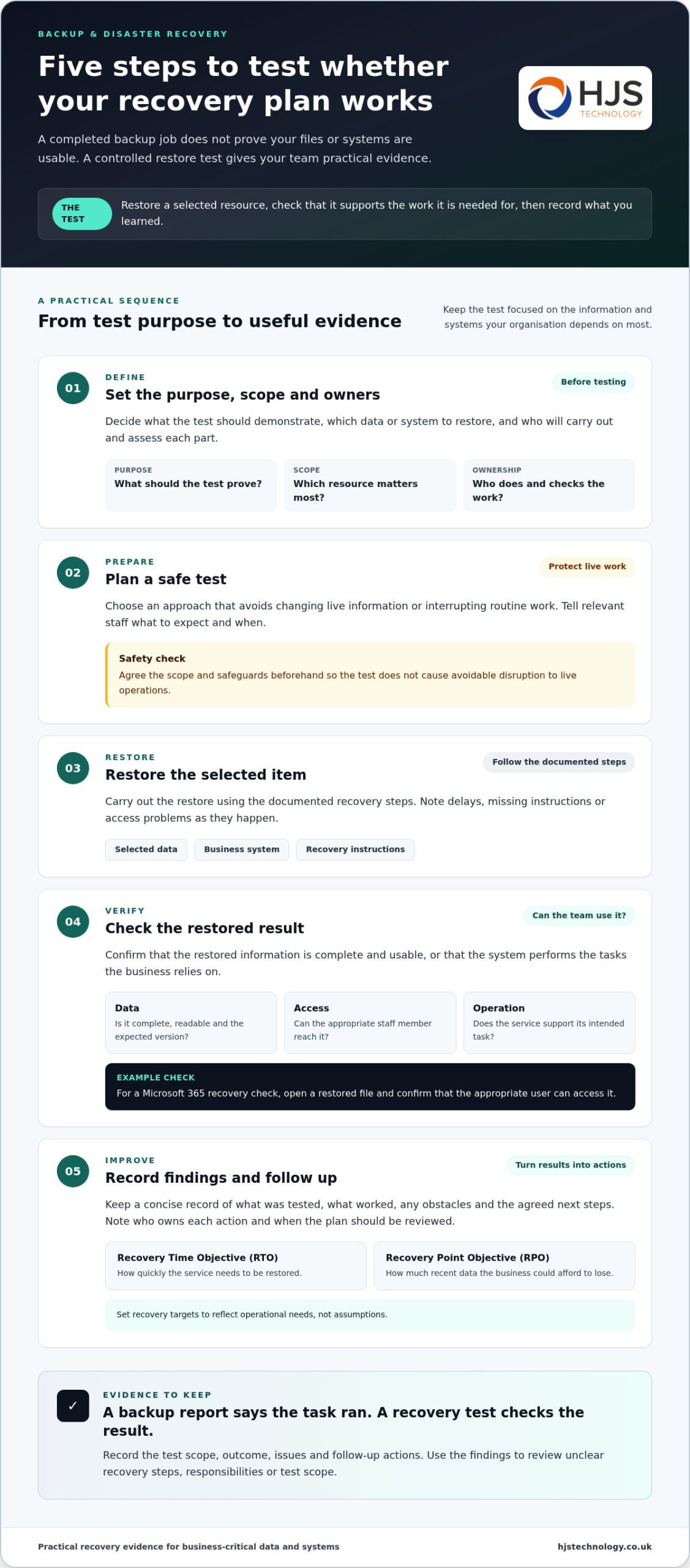
A planned, controlled test checks whether selected data or systems can be restored and whether the result supports the work your business needs to resume. Agree the scope and safeguards beforehand to avoid unnecessary disruption to live operations.
- Set the purpose, scope and owners. Decide what the test should demonstrate, which data or system to restore, and who will carry out and assess each part.
- Plan a safe test. Choose an approach that avoids changing live information or interrupting routine work. Tell relevant staff what to expect and when.
- Restore the selected item. Follow the documented recovery steps and note any delays, missing instructions or access problems as they occur.
- Check the result. Confirm that restored data is complete and usable, or that the system performs the tasks the business relies on. For example, a Microsoft 365 recovery check could include opening a restored file and confirming that the appropriate user can access it.
- Record findings and follow up. Document what worked, what needs attention, who owns each action and when the plan should be reviewed.
What should you record after each recovery test?
Keep a concise record of the test’s purpose, the data or system examined, the outcome, any obstacles and agreed next steps. Include the recovery time objective (RTO), meaning how quickly a service needs to be restored, and the recovery point objective (RPO), meaning how much recent data the business could afford to lose. Set these targets to reflect operational needs, not assumptions.
For a test involving Microsoft 365 information, note which files or services were included and whether staff could use them as intended. HJS Technology provides Microsoft 365 services for organisations using the platform.
How can test results lead to practical improvements?
Turn each problem into a clear action. Assign an owner to resolve issues such as missing access, unclear recovery instructions or outdated system details, then record when the fix is complete and whether it needs to be retested. This improvement cycle helps keep tested backup and disaster recovery solutions in place as business systems change.
Hogyan segíthet a HJS Technology a tesztelt helyreállítás kialakításában?
HJS Technology Ltd helps businesses connect backup and recovery planning with the information, systems and day-to-day operations they need to restore. Its data backup and recovery services, using Datto and Acronis, sit alongside disaster recovery and business continuity planning to help organisations shape recovery around business priorities.
Planning starts with understanding what the organisation depends on and what disruption would mean for its work. This helps decision-makers distinguish essential systems and data from resources that can be restored later, then set recovery priorities and plan appropriate tests. HJS’s disaster recovery planning supports this business-focused approach.
What can recovery planning cover?
Recovery planning can cover restoring important data, repairing affected systems and identifying improvements after an incident. A test or real disruption may show that instructions need updating, responsibilities need clarifying or recovery arrangements should better reflect how the organisation now operates.
The plan should reflect the business environment and operational needs. For example, a Hampshire organisation might prioritise access to records and systems needed to serve customers, while considering how staff would continue essential work during recovery. The goal is a useful plan for the people responsible for keeping operations moving, not just a technical document.
What is a useful next step for a Hampshire business?
Start by reviewing how current backups work and listing the data and systems most important to your business. Note who relies on each one, who would coordinate recovery, and whether existing instructions reflect your current setup. This creates a clear starting point for deciding where a controlled test could provide useful evidence.
Based in Southampton, HJS Technology Ltd supports businesses across the south coast, including Southampton, Portsmouth, Winchester, Eastleigh, Fareham, Dorset, Poole, Hampshire, Salisbury, Wiltshire and Bournemouth. The team can help connect recovery planning with your organisation’s priorities and operational requirements, building towards tested backup and disaster recovery solutions in place.
To discuss your organisation’s recovery readiness, talk to HJS Technology Ltd about recovery planning.
Make recovery readiness part of business planning
Recovery planning works best when it stays connected to how your organisation changes. New systems, changing responsibilities and evolving priorities can all affect what needs to be restored first, so treat each significant change as a prompt to review whether the plan still fits.
Use the outcome of each recovery exercise to guide the next conversation: what should the business protect, who needs to be involved, and what would make the next test more useful? This keeps the work focused on operational needs rather than paperwork alone, and makes tested backup and disaster recovery solutions in place an ongoing business priority.
HJS Technology can work with your team to consider recovery readiness in the context of your organisation’s systems and objectives.
Speak with HJS Technology to discuss a practical next step for your recovery planning.
Frequently Asked Questions
How often should a business test its backups?
There’s no single testing schedule that suits every business. Set a review rhythm based on how essential each system is, how often its data changes and what would happen if it couldn’t be restored. Revisit the schedule after major changes, such as adopting a new business system or changing how staff work. Keep a record of completed tests so planned checks don’t quietly lapse.
Can a recovery test disrupt normal work?
A carefully scoped test can check recovery while limiting unnecessary impact on live work. Before starting, agree which systems are involved, who needs to know and how the test will be contained. For example, a team might examine a restored copy rather than alter the information staff use each day. The possible effect depends on the system and how the exercise is designed.
What do RTO and RPO mean in disaster recovery?
RTO, or recovery time objective, is the target time for restoring a service. RPO, or recovery point objective, describes how much recent data loss the business could accept, measured in time. These are planning targets, not guarantees. Consider how long staff could manage without a system and how much work would need repeating if recent updates were missing.
How can I tell whether a backup test was successful?
Agree what success means before the exercise, then assess the result against those criteria. For instance, a finance team might check that a restored report opens correctly and contains the expected entries before using it for a routine task. Note any difference between the intended and actual result, including who can use the restored resource. This evidence helps show whether tested backup and disaster recovery solutions in place meet practical needs.
What is the difference between backup and disaster recovery?
Backup focuses on keeping copies of data; disaster recovery covers the broader steps for restoring services after a disruption. A recovery plan may need to account for dependencies as well as files, such as which systems must be available before staff can resume a particular task. For a business in Southampton or elsewhere in Hampshire, mapping those dependencies can help clarify what to restore first and who should coordinate it.