

A complex incident can stall even after your IT team has completed its usual checks. 3rd line escalation support for IT departments can bring in specialist expertise, but it works best when everyone knows who owns the issue, what information to hand over and how updates will be shared. HJS Technology Ltd provides managed IT support that includes 1st, 2nd and 3rd line helpdesk support.
It’s understandable to want extra capacity without giving up control of your support arrangements. Treat an external specialist as an extension of your team: agree responsibilities in advance and keep your internal staff informed as the issue is investigated.
This guide explains which issues may merit escalation, what to include in a useful handover and what to check when assessing a support partner. It also covers ways to keep communication and accountability clear, so complex incidents can be addressed without losing sight of the rest of your IT operation.
In short: 3rd line escalation is useful when an issue remains unresolved after routine support or needs expertise your team doesn’t have available. Agree what gets escalated, who retains ownership, what information is handed over and how progress is communicated. This helps external specialists extend your IT team rather than replace it.
Key Takeaways
- Use 3rd line escalation support for IT departments when an issue needs specialist investigation beyond the expertise or capacity available in earlier support tiers.
- Agree who owns the incident, user updates and technical resolution before an issue is escalated.
- Prepare a concise record of the affected systems, recent changes, checks already completed and access requirements to help specialists investigate efficiently.
- Compare providers on technical scope, escalation routes, access controls and fit with your internal processes. Confirm exclusions and service commitments directly.
When does an IT department need 3rd line escalation support?
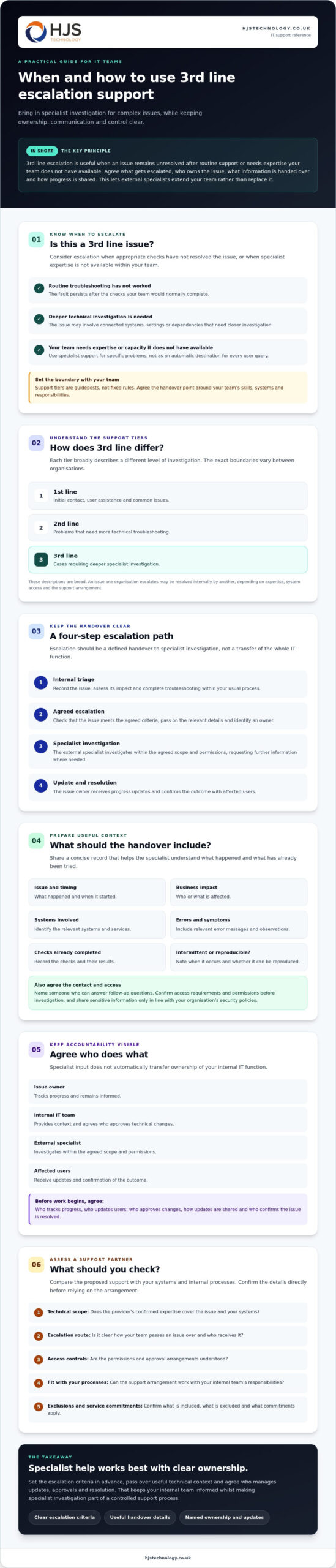
3rd line support is specialist escalation for complex technical issues that earlier support tiers haven’t resolved or aren’t equipped to investigate. The names and boundaries of support tiers vary between organisations, so define the handover point around your team’s skills, systems and responsibilities.
Consider escalation when an issue remains unresolved after appropriate checks, or needs specialist expertise your internal team doesn’t have available. This doesn’t mean replacing your IT department or passing every user query to an external provider. It gives your team another route for specific problems, while an agreed owner continues to track the incident.
What does 3rd line IT support handle?
It may cover persistent faults, complex technical problems or issues that need deeper investigation across systems. For example, if a service continues to fail after routine troubleshooting, an investigator may need to look at how connected systems, settings or dependencies interact.
The right scope depends on the provider’s confirmed expertise and your systems. Before escalating, check that the issue falls within the agreed service and share what has already been tested, including the results. HJS Technology Ltd provides managed IT support, including 1st, 2nd and 3rd line helpdesk support.
How does 3rd line support differ from 1st and 2nd line?
In broad terms, 1st line is the initial point of contact for user assistance and common issues. 2nd line typically investigates problems that need more technical troubleshooting, whilst 3rd line focuses on cases requiring deeper specialist investigation.
These are guideposts, not fixed rules. An internal technician may resolve an issue that another organisation escalates. The appropriate handover depends on staff expertise, system access and the support arrangement. Agreeing that boundary helps your team draw on external expertise without handing over routine requests or losing sight of responsibility.
How should 3rd line escalation work with your internal IT team?
3rd line escalation works best as a clear handover, not a transfer of the whole IT function. Agree the route from internal triage to specialist investigation, then define who tracks the issue and communicates the outcome.
- Internal triage: The IT team records the issue, checks its impact and completes the troubleshooting within its usual process.
- Agreed escalation: If the issue meets the agreed criteria, the team passes on the relevant details and identifies an owner.
- Specialist investigation: The external specialist investigates within the agreed scope and permissions, asking for further information where needed.
- Update and resolution: The issue owner receives progress updates and confirms the outcome with affected users.
Escalation adds specialist expertise; it doesn’t automatically transfer end-to-end ownership of your internal IT function. Decide in advance who approves technical changes, who communicates with users and who checks that the fix has resolved the issue. Don’t assume these responsibilities are understood by both teams.
What information should an escalation handover include?
A useful handover gives the specialist enough context to investigate without repeating basic discovery. Record what happened, when it started, the business impact, the systems involved, relevant error messages and the checks already completed. If the fault is intermittent, note when it occurs and whether anyone can reproduce it.
Include a named contact who can answer follow-up questions and help clarify the impact. Share access or sensitive information only in line with your organisation’s security policies, and agree the permitted access before investigation begins.
How can teams keep ownership and updates clear?
Agree who tracks progress, who updates affected users and who confirms resolution. Set out the escalation route and how updates will be shared in the support arrangement, including who to contact if the issue’s impact changes or a related system is affected.
Before work starts, establish the system context, access permissions and change approval process. If you’re assessing how an external team could complement your existing arrangements, review HJS Technology Ltd’s managed IT support scope and discuss your requirements.
How can you prepare your business for 3rd line IT support?
Prepare by agreeing support boundaries, keeping system records current, defining secure access and deciding how teams will communicate. These steps give an external specialist useful context and reduce the chance of spending time reconstructing information your internal team already holds.
- Set the boundaries: Record which issues qualify for escalation, what falls outside the agreed scope and who retains responsibility for the user relationship.
- Keep system records current: Maintain an inventory of relevant equipment and services, configuration details and a record of recent changes.
- Agree access and approvals: Follow your organisation’s security policies. Give specialists only the access needed for the agreed task, and establish who can approve changes before work begins.
- Plan communication: Name the internal contact, agree how updates will be shared and confirm who will tell users about progress or resolution.
A maintained record of systems and recent changes can help narrow down what to investigate. For example, noting when a service configuration changed gives the specialist a starting point for checking whether the fault relates to that change. HJS Technology Ltd’s business IT support information provides further details about its support services.
What should you agree before escalating a live issue?
Document the circumstances that trigger escalation and identify who owns the user relationship throughout the investigation. Agree how sensitive information will be shared and how remote access will be authorised and managed under your organisation’s policies. It’s also useful to confirm how a proposed change will be reviewed and approved before it is made.
Which records help an external specialist investigate?
Keep records relevant to the affected service, such as asset details, configuration information, recent changes and troubleshooting already completed. For recovery-related issues, identify where the relevant backup and recovery information is held, and confirm what access or authority the specialist needs before work begins.
How do you choose 3rd line escalation support for an IT department?
Choose a provider whose technical scope and working practices fit your systems and internal processes. Before committing, confirm which issues they cover, how cases move between teams, how access is managed and what service commitments apply. Ask for examples of how a handover works, rather than relying on a general description of support.
| What to assess | What to confirm |
|---|---|
| Scope | Which systems and issue types are covered, and what needs separate agreement? |
| Escalation route | How are cases received, recorded and handed to a specialist? |
| Access controls | How is access authorised, limited and managed under your organisation’s policies? |
| Communication | Who receives investigation updates, and who keeps affected users informed? |
| Fit with your team | Can the provider work with your existing tools, processes and ownership arrangements? |
Ask the provider how it records investigations and coordinates with your internal IT team. Verify technical coverage, exclusions, response commitments and on-site arrangements in writing. If your organisation is in Southampton, Portsmouth, Winchester, Eastleigh, Fareham, Dorset, Poole, Hampshire, Salisbury, Wiltshire or Bournemouth, local support may be relevant when you are considering an on-site requirement. Confirm availability and timings rather than assuming them.
Could HJS Technology Ltd support your internal IT team?
HJS Technology Ltd is based in Southampton and provides 1st, 2nd and 3rd line helpdesk support to organisations across the South of England. Its business IT support service may be worth discussing if you’re considering external expertise alongside an in-house team. Whether it’s a fit depends on your systems, the scope you need and the responsibilities you agree.
Before deciding, ask how your team’s escalation route and support needs could align with the service, and confirm any relevant commitments directly. A clear discussion can help establish whether the arrangement complements your internal capability.
Make escalation support work for your team
Effective 3rd line escalation support for IT departments depends on more than access to specialist knowledge. Clear escalation criteria, useful system records and agreed ownership help external expertise complement your team without disrupting existing support arrangements.
Before choosing a partner, confirm which systems and issues are covered, how access and approvals are handled, who updates users and what service commitments apply. These details give your team a practical basis for deciding whether the arrangement fits your organisation.
HJS Technology Ltd is based in Southampton and serves organisations across the South of England. Its helpdesk includes 1st, 2nd and 3rd line support, which may be worth discussing as an extension to your internal capability, subject to the scope you need.
A clear conversation can help you identify the right boundaries and next steps for your team.
Frequently Asked Questions
What is 3rd line escalation support for IT departments?
3rd line escalation support for IT departments gives an internal team access to specialist help for issues that remain unresolved through its usual support process. The precise boundary depends on the organisation and provider, so agree which issues qualify before engaging support. Set out what information to include in a handover and who remains responsible for user communication and confirming resolution.
When should an IT department escalate a support issue?
Escalate an issue when it remains unresolved after your team’s agreed troubleshooting, needs expertise your team doesn’t have available, or is affecting business operations and requires further investigation. Set the criteria with the support provider before an incident occurs. The right trigger depends on your systems, internal skills and agreed service scope, rather than a universal rule based on how long a fault has lasted.
Does 3rd line support replace an in-house IT team?
Not necessarily. An organisation can use 3rd line support to extend its internal team’s access to specialist expertise whilst retaining day-to-day IT ownership in-house. Agree which team investigates, who updates users and who approves technical changes. Check the provider’s documented service scope before assuming it fits your existing structure, as responsibilities and support boundaries can differ between arrangements.
What information should we provide when escalating an IT issue?
Provide a concise description of the issue, its business impact, the affected service, relevant error messages and the troubleshooting already completed. Include recent system changes and a suitable contact who can answer follow-up questions. Share sensitive information or access details only through processes approved by your organisation. A clear handover helps the specialist investigate with relevant context and reduces avoidable repetition.
Can an external provider work alongside our internal IT department?
Yes, an external provider can work alongside your internal IT department when both sides agree responsibilities, escalation routes, access permissions and communication expectations. Explain how your team handles incidents and approves changes, then confirm what the external service covers. Document who tracks progress and updates users before a live issue arises, so each team understands its role and can follow the same process.